 Seamfold
Photo dump ideas for social media
A photo dump is a carousel of casual, mixed photos from a week, a trip or an event, posted with little polish. It works best with 6 to 12 slides, a strong first photo, a mix of wide and close shots and one detail that rewards the last swipe.
Coming soon to iPhone
What is a photo dump?
A photo dump is a carousel that collects pictures without a single strict subject: a weekend, a season, a trip or a random mix. The name suggests a messy pile, and the charm is that it feels unposed. In practice the best ones are curated carefully and only look careless. The format is a normal multi-photo post, so the same limits apply: up to 20 slides, one ratio for all.
What kinds of photos go in a dump?
Mix scale and subject so each swipe shows something new. These types combine well.
- A wide scene that sets the place.
- A close-up of food, a drink or a detail.
- A portrait or a candid of a friend.
- A photo of a sign, a ticket or a handwritten note.
- A blurry or motion shot that adds energy.
- A screenshot of a text or a playlist, if you like that style.
- A short panorama that spans several slides.
- A final photo that ends with a smile or a joke.
How do you order the slides?
Start strong and end with a reason to stay. Slide 1 decides whether anyone swipes, so use your best photo or a graphic cover. Slides 2 and 3 should differ from it in subject and scale. The middle can hold quieter pictures. Keep the last slide memorable, because it is what people remember. Do not put two near-identical photos next to each other, since the second one looks like an error.
- Pick your best photo for slide 1.
- Choose a contrasting photo for slide 2, for example a close-up after a wide shot.
- Alternate wide, close and people for the next slides.
- Place a quiet photo around the middle to give the eye a rest.
- End on a strong or funny frame.
- Swipe through once to check the rhythm.
How many photos should a dump have?
Six to twelve is a comfortable range. Fewer than six feels thin, and more than twelve tests patience unless every slide is good. The 20-slide limit is a ceiling, not a target. For more on counts by post type, see how many slides a carousel should have.
How do you keep a dump from looking messy?
Use a few quiet rules. Edit all photos with the same preset or a similar warmth, so the colors agree. Keep one ratio for every slide, 4:5 or 3:4, because the social app uses the first slide's ratio for the whole post. Crop vertical photos to fit rather than letting them show with bars. And choose a repeating element, such as a color, a location or a person, to connect the slides.
Editing for the same look does not mean heavy filters. A small adjustment to brightness and warmth is enough to make a mixed set read as one day.
Can you add a panorama to a dump?
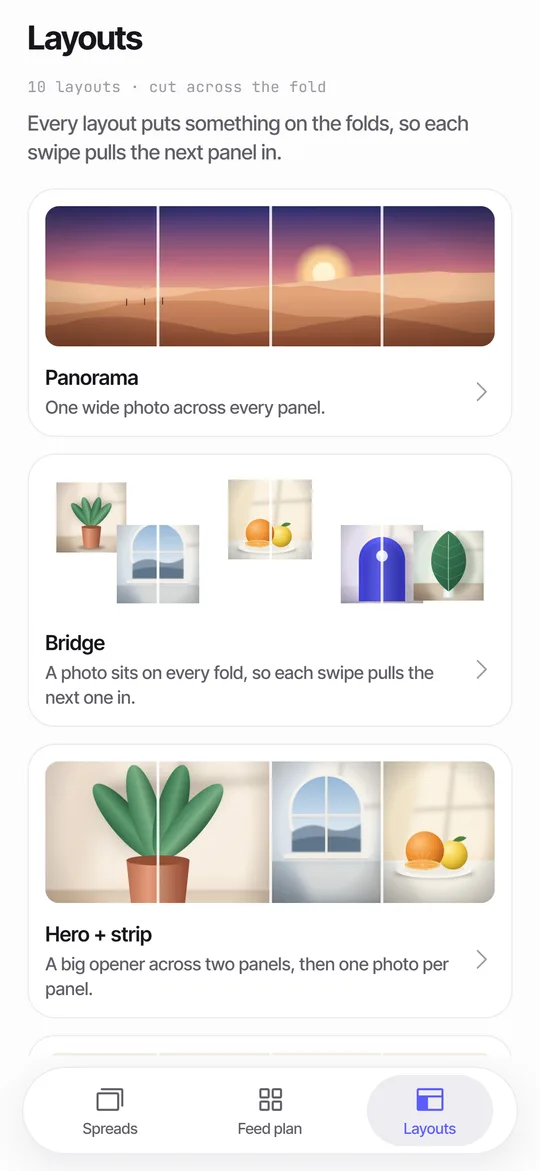
Yes, and it is a good way to stand out. Take a wide shot and cut it into two or three panels, then place them in the middle of the dump so the horizon continues across the swipe. Seamfold's Bridge layout puts a photo on every fold, and Panorama spans one photo across all panels. A mixed layout is also possible, with 10 layouts in total and 6 of them free. See how to make a seamless carousel for the steps.
Which photo dump ideas work for different occasions?
| Occasion | Idea | Slide types |
|---|---|---|
| Weekend | Saturday morning to Sunday night | Coffee, walk, friends, food, sunset |
| Trip | One slide per place, plus a panorama | Landmark, street, meal, room, view |
| Season | What autumn looked like | Leaves, sweaters, light, a market |
| Birthday | Small moments from the day | Cake, gifts, group, candid, a card |
| Workday | Behind the scenes | Desk, tools, a draft, a break, a finished piece |
| Month in review | One photo per week | Four to five slides with a date each |
What should the caption say?
Keep it short and playful, and give context without explaining every photo. A date range, a place or a one-line joke is enough. The caption field holds up to 2,200 characters, but a dump rarely needs more than a line or two. If you plan your post in Seamfold's feed plan, the caption draft shows a counter against 2,200 characters and a Copy caption button.
How do you choose which photos to include?
Start with twice as many as you need, then cut. Remove duplicates and near-duplicates, photos where the subject is unclear and anything that needs an explanation to enjoy. Keep the ones that make you remember the moment. A good test is to show the set to a friend who was not there. If they pause at a photo and ask a question, keep it. If they scroll past, cut it.
Do not worry about perfect quality. A slightly blurry candid often beats a technically perfect but empty shot. But do make sure the key slides are sharp, since the first three set the tone. The blurry carousel guide lists the causes of soft pictures.
How do you prepare the photos on an iPhone?
Open the Photos app and create an album for the dump, then add the picks in the order you plan to post them. Crop vertical shots to one ratio, either 4:5 or 3:4, so that no slide shows bars. Apply one light edit to everything so that the colors agree. Then open the social app, tap the multi-select icon and tap the photos from first to last. If one of the slides is a panorama cut into panels, save the panels in order and keep them together in the album.
What mistakes ruin a dump?
Using too many near-identical photos, mixing ratios, picking a weak first slide and writing a long caption that explains every slide. Another common mistake is adding a trend sound or text on every slide, which turns a relaxed format into a busy one. A dump should feel like a flip through a camera roll with a friend, so keep the touches light.
Is a photo dump good for growth?
It can be, because people like to see lives and places rather than a feed of ads. A dump also offers many reasons to swipe, and every swipe is a sign of interest. But it is not a magic format. Poor photos in a long carousel do not help, and a quality set of five photos will do better than a pile of twenty. Start from what your audience likes about you, then show that in a looser way.
Frequently asked questions
What is a photo dump on social media?
A carousel of casual, mixed photos from a period or event, posted with little polish.
How many photos should be in a photo dump?
Six to twelve for most posts. The social app allows up to 20.
Do photo dump photos need the same filter?
They should look related. A shared light edit is enough to make mixed photos read as one day.
What should be the first photo in a dump?
Your strongest photo or a simple cover, since the first slide also becomes the profile grid tile.
Can I mix a panorama into a photo dump?
Yes. Cut it into two or three panels and place them next to each other so the picture continues across the swipe.
Keep exploring
 How to Split a Panorama for a Carousel, With SizesPanel counts, pixel widths and the steps to cut a panorama into a carousel.
 Panorama Splitter for Social Carousels on iPhoneCut a panorama into 2 to 20 panels, or build a spread from several photos with 10 layouts.Carousel SizeSizes for 4:5, 3:4 and square carousel panels, slide limits and how to choose.