 Seamfold
How to make a photo collage carousel on iPhone
A collage carousel places several photos across the folds of one wide spread, so the photos overlap the swipe instead of sitting in separate slides. Pick the photos, choose a layout, adjust each frame, check the seams and the cover, then export the panels in order to Photos.
Coming soon to iPhone
What is a collage carousel?
A normal photo carousel is a row of independent slides. A collage carousel treats the slides as windows onto one wide canvas, and photos sit on that canvas, some of them across a fold. When the viewer swipes, a photo slides in half-way and finishes on the next slide. The effect feels continuous even though the photos differ. Collage as an art form is a century old, and the swipe adds motion to it.
Which layouts help?
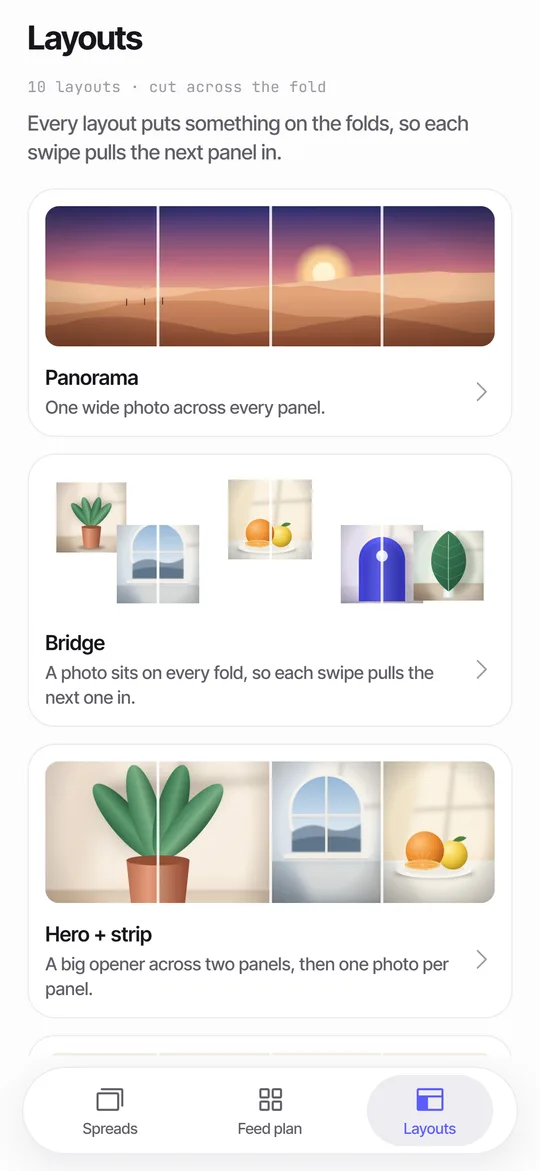
Seamfold offers 10 layouts that decide where photos land on the spread. Six are free, and four need Pro. The free ones are Panorama, Bridge, Hero + strip, Headline across, Cover title and Frames.
| Layout | Plan | Photos | What it does |
|---|---|---|---|
| Panorama | Free | 1 or more | One wide photo across every panel |
| Bridge | Free | 3 or more | A photo sits on every fold |
| Hero + strip | Free | 2 or more | A big opener across two panels |
| Headline across | Free | 2 or more | A large line of text across the folds |
| Cover title | Free | 1 or more | A title on the first panel |
| Frames | Free | 3 or more | Framed photos on the spread |
| Film strip | Pro | 4 or more | Dark background, strip of frames |
| Scatter | Pro | 4 or more | Photos placed loosely |
| Mosaic | Pro | 4 or more | Photos in a tight mosaic |
| Before / after | Pro | 2 or more | Two halves for a comparison |
How do you build it, step by step?
- On the Spreads tab, tap New spread.
- Choose a ratio: 4:5, 3:4 or 1:1.
- Pick several photos with the system photo picker.
- Choose a layout from the list. Bridge is a good first choice.
- Slide, zoom or replace photos inside their frames until the folds look right.
- Run the checks, the swipe test and export.
How many photos work best?
Three to eight photos on a 3 to 5 panel spread is a comfortable range. Fewer than three gives little to arrange, and more than eight crowds the spread unless you use a mosaic. The free plan limits spreads to 4 panels, and Pro raises the limit to 20. If you have a wide panorama plus a few small photos, use Hero + strip or Bridge and keep the panorama as the main image.
How do you handle photos on the folds?
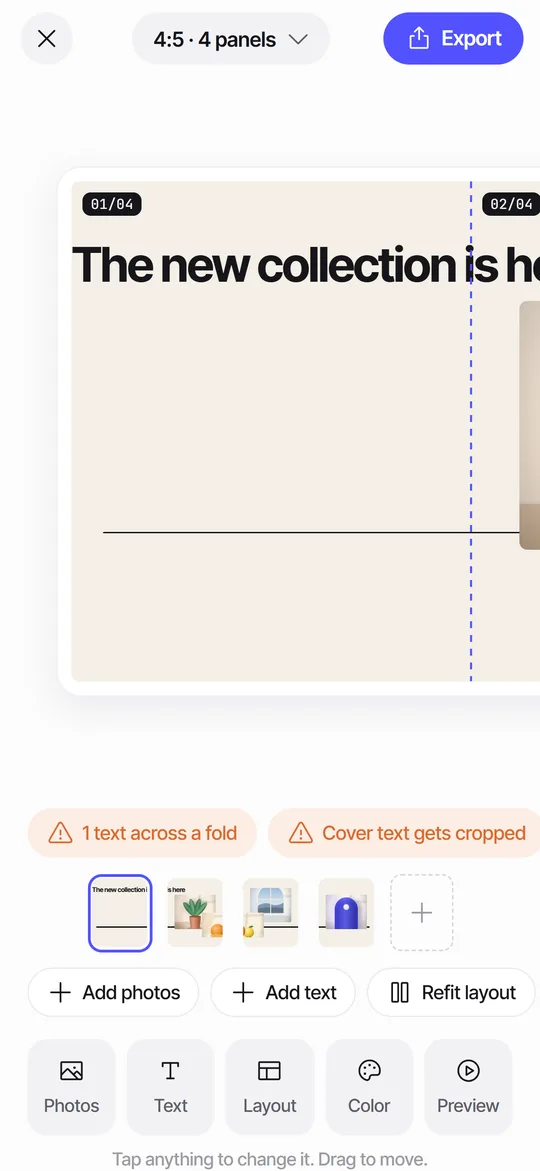
That is the whole point. A photo on a fold is cut by the swipe, so give it room to be seen on both sides. Faces are the exception: keep them whole on one panel unless you want a deliberate split. Seamfold shows dashed fold lines with numbers such as 02/04 while you edit, so you always know where the cuts fall, and the lines disappear in the swipe test and in the exported panels.
What about text?
Add a headline in the display or mono style, change its size, alignment and color, and choose a background from 12 colors. The seam check tells you when a text crosses a fold and offers a nudge to a clean position. For a collage with a big headline, the Headline across layout is built for it, and you can leave the flag on purpose when the effect is intended. The guide to text across carousel slides covers sizes and gaps.
How do you check the cover?
The first panel is the cover in the profile grid, shown in a 3:4 window. The cover check shades the trimmed zones and labels the cover as safe, safe with edges trimmed, or text cropped. A collage cover should hold one clear photo and little text. If you export at 3:4, the tile matches the panel and nothing is trimmed.
What if the photos do not fit the layout?
Use the Refit layout chip to re-place everything after you swap photos. If a photo is too small for its frame, the editor shows a chip like 1 photo may look soft. Replace it with a bigger photo or choose a layout with smaller frames. Layout counts matter too: Bridge needs at least 3 photos and Mosaic needs 4.
Collage tips
- Keep one photo bigger than the rest, to give the eye a start.
- Match the light and color of the photos, or choose a background that unites them.
- Leave some space between frames, so folds are visible.
- Put the best photo on slide 1, inside the middle 3:4 window.
- Swipe through twice: once for flow, once for details.
- Export all panels in one batch.
How is a collage carousel different from a photo dump?
A photo dump uses one photo per slide, each independent, so the swipe moves from one picture to another. A collage carousel treats the slides as one canvas, and some photos sit across folds. The dump is looser and faster to make. The collage takes more care and looks designed. Both are good, and they suit different moods: a dump says this is a camera roll, and a collage says this is a layout. You can also mix them by using a collage for the first three slides and plain photos after that.
What about the free plan?
The free plan covers unlimited spreads, all three ratios, 2 to 4 panels and 6 of the 10 layouts, plus the seam check, the cover check and the swipe test. Exports from the free plan carry a small mark on the last panel in the bottom right corner. Pro raises the panel limit to 20, adds the other four layouts, removes the mark and lifts the feed plan limit. Prices are shown in the app and not listed here, because Seamfold is in development. The pricing page has the full list.
How do you save and share the panels?
Tap Export, then save. Seamfold asks for add-only permission to Photos at that moment, and writes the panels in order with panel 1 first. You can also share a single panel through the share sheet. In the social app, tap the multi-select icon and pick the panels from the first to the last. Keep the composer at the ratio you exported, because a re-crop shifts the folds. The seamless carousel guide describes the posting order in detail.
Other ways to make a collage post
A normal collage tool puts several photos on one slide. That makes a single image, which has its own uses, but it does not move. If you prefer ready-made templates, a design suite does more. Seamfold is in development, with the details on the features page.
Frequently asked questions
How do I make a collage carousel on iPhone?
Pick several photos in a splitter app, choose a layout that places them across the folds, adjust the frames, check the seams and export the panels in order.
How many layouts does Seamfold have?
Ten. Six are free: Panorama, Bridge, Hero + strip, Headline across, Cover title and Frames. Four need Pro.
How many photos does Bridge need?
At least three. It places a photo on every fold.
Can I put text in a collage carousel?
Yes. Add text in two styles, change its size, alignment and color, and use the seam check for folds.
What does the free plan limit?
Spreads up to 4 panels and 6 of the 10 layouts, with a small mark on the last panel. The app is in development.
Keep exploring
 Panorama Splitter for Social Carousels on iPhoneCut a panorama into 2 to 20 panels, or build a spread from several photos with 10 layouts.
 Seam CheckFinds text cut by a fold between panels and moves it for you.Carousel SizeSizes for 4:5, 3:4 and square carousel panels, slide limits and how to choose.Seamfold PricingFree: 2 to 4 panels, 6 layouts, all checks. Pro: 20 panels, all layouts, no mark, unlimited feed plan.Continuous Carousel in an Image EditorThe manual method with canvas sizes, guides, slicing and export, plus where a phone app saves time.