 Seamfold
How to make a puzzle feed
A puzzle feed is one large picture cut into tiles and posted as separate posts, so the profile grid reads as a single image. Since the grid moved to 3:4 tiles, a 3x3 puzzle should be 3,240 x 4,320 px, cut into nine 1,080 x 1,440 px pieces, and posted last tile first.
Coming soon to iPhone
What is a puzzle feed?
A puzzle feed spreads one design over several posts. Each post is a tile, and when the tiles sit side by side on your profile they form the full picture. Brands use it for launches, and artists use it to show a large work piece by piece. The idea is older than the current grid, and it still works if the math matches the grid shape. It borrows from a basic layout tool, the grid, which guides where each element sits.
It is a different thing from a swipe carousel. A carousel keeps all panels inside one post, so the viewer moves through them with a thumb. A puzzle feed lives on the profile page and only reads as a picture there. If your goal is a picture that continues while someone swipes, read the guide to a seamless carousel instead.
What size should the tiles be now?
The profile grid shows vertical 3:4 tiles, as covered in the 3:4 grid crop guide. If you post tiles at 1080 x 1440 px, the grid shows each one whole and the puzzle lines up. A 3-column puzzle with three rows is then 3,240 x 4,320 px, which is itself a 3:4 canvas. Older square tiles, 1080 x 1080 px, now lose a quarter of their width in the grid and break the picture.
| Puzzle | Canvas | Tile | Ratio of canvas |
|---|---|---|---|
| 3 x 1 | 3,240 x 1,440 px | 1,080 x 1,440 px | 9:4 |
| 3 x 2 | 3,240 x 2,880 px | 1,080 x 1,440 px | 9:8 |
| 3 x 3 | 3,240 x 4,320 px | 1,080 x 1,440 px | 3:4 |
| 3 x 4 | 3,240 x 5,760 px | 1,080 x 1,440 px | 9:16 |
How do you build one, step by step?
Plan the tile count first, because the rest follows from it. Three columns are fixed by the profile, so only the number of rows is your choice. Most people pick one or two rows, since more rows need more posts and a longer wait before the picture is complete.
- Pick the number of rows. One row is three posts, three rows is nine.
- Create a canvas at 3,240 px wide and 1,440 px per row in any design tool.
- Design across the whole canvas. Keep important faces and words away from the tile borders.
- Cut the canvas into 1,080 x 1,440 px tiles. A grid splitter or guides in your editor will do it.
- Name the files in posting order so you cannot mix them up.
- Post the tiles in reverse reading order, starting with the bottom right one.
In what order do you post the tiles?
The newest post always lands at the top left of the grid, and older posts move one slot to the right and down. So the last tile in reading order, bottom right, goes up first. The top left tile goes up last, and the picture is complete only after the final post.
Between posts the profile shows a half-built puzzle. That is normal. Space the posts close together, within a day or two, or accept a few days of a partial picture. If you post anything else in the middle, it will push the tiles out of place. Pause other posts until the puzzle is finished, or post them as carousels and short videos that you do not mind in the grid.
Which crop traps break a puzzle?
The tile is not the only thing the social app crops. In the feed a 3:4 post is shown whole, but other places show other shapes, and a post can be pushed out of place by pinned items.
- Pinned posts take the first slots of the grid and shift the tiles that follow. Unpin before you start.
- A square tile loses about a quarter of its width in a 3:4 grid.
- A 4:5 tile is shown at about 1013 x 1350 px inside the grid tile, so the edges get trimmed and thin lines can appear between pieces.
- Collab posts and posts from other accounts can fill slots in some layouts. Check your own grid after every post.
- A story or short video cover that you reuse as a tile needs a 3:4 window, not the full vertical frame.
How do you handle the gap lines between tiles?
The grid draws thin gaps between tiles, so a puzzle never looks like one printed poster. Design for it. Avoid hairline details that cross the borders, such as a thin horizon or a text underline, because a gap through them looks like damage. Large shapes, color fields and big photographs hide the gaps well. A line of text should stay inside one tile.
Can you preview the puzzle before posting?
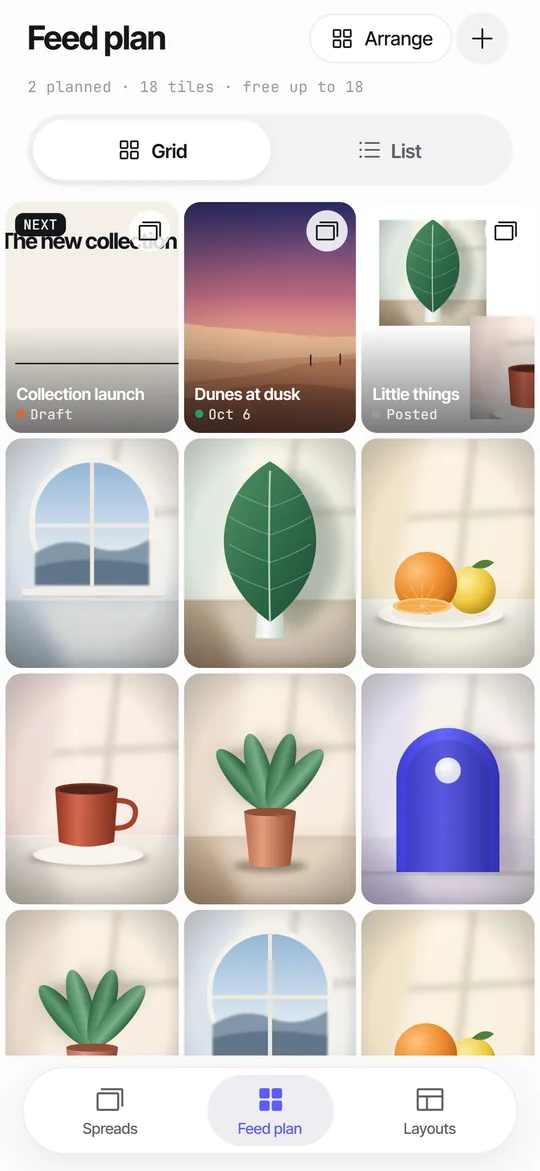
Yes, and you should. A mock grid shows the picture in its real 3:4 tiles with your older posts around it. Many planners offer a preview of this kind. Seamfold has a feed plan with a 3-column grid of 3:4 tiles, which keeps everything on the iPhone with no login and no upload. Planned spread covers sit next to photos you already posted, so you can see how a piece fits the colors of the posts around it.
Seamfold does not cut a picture into a 3 x 3 puzzle. It cuts horizontal strips for carousels. Use its feed plan for the look of the grid, and use a grid splitter for the cutting. The feed planner guide explains the approach.
Is a puzzle feed still worth the effort?
It is worth it when the picture carries meaning, such as a product reveal or a photo series that is stronger as a whole. It is a poor fit for accounts that post often and about different subjects, because every unrelated post breaks the picture. A puzzle also does nothing for people who find you through a short video or a search, since they land on one post, not on the grid.
A middle path is a single row of three tiles, a 9:4 strip, which reads as one wide image and needs only three posts. For many accounts a swipe carousel gets more use out of the same wide picture. If you cannot decide, compare both on a mock grid first.
A short checklist before the first post
- All tiles are exactly 1,080 x 1,440 px.
- The files are numbered in posting order, last tile first.
- Faces, logos and words sit well inside their tile.
- Nothing is pinned to the profile.
- You have no other post planned until the puzzle is done.
- You checked the result on a mock grid.
Frequently asked questions
What size should a puzzle feed be in 2026?
Cut tiles at 1,080 x 1,440 px (3:4). A 3 x 3 puzzle is a 3,240 x 4,320 px canvas. Square tiles no longer fit the 3:4 grid.
In what order do I post a puzzle feed?
Post the last tile in reading order first, the bottom right one, and finish with the top left tile. New posts always appear at the top left.
How many posts does a puzzle feed need?
Three posts for one row, six for two rows and nine for a 3 x 3 puzzle. The profile has three columns, so every row is three posts.
Why do my puzzle tiles look cut off?
The grid shows a 3:4 window. Square or 4:5 tiles are trimmed at the sides, which breaks the picture and cuts anything near the edge.
Can Seamfold make a puzzle feed?
No. Seamfold cuts horizontal strips for swipe carousels. Its feed plan can preview planned covers in a 3-column grid of 3:4 tiles. It is in development, so check the features page.
Keep exploring
 Feed Planner That Stays on Your iPhoneA local 3-column grid of planned covers and posted photos, with dates, status and captions.Feed Planner Without an Account or CloudWhat to look for in a local feed planner and how to plan 3:4 tiles on device.Carousel SizeSizes for 4:5, 3:4 and square carousel panels, slide limits and how to choose.Feed Layout Ideas That Keep the Grid TidySeven grid layouts with the rule behind each and how to preview them in 3:4 tiles.