 Seamfold
Story teaser ideas for a new carousel
A story teaser is a 1080 x 1920 px image that announces a new post and tells people to swipe it. The best ones show the whole picture as a strip or the first panel with the second peeking in, carry five words of text and go live right when the carousel does.
Coming soon to iPhone
Why does a carousel need a teaser?
A panorama carousel looks like one slide in a preview, and people scroll past a single slide. A story gives you a second chance to show the whole thing, to people who open stories more often than they scroll the feed. The teaser says two things: there is a new post, and it moves. Without that second message many viewers never learn that the picture continues.
What size is a story teaser?
Stories use a vertical 9:16 frame, 1080 x 1920 px. Anything else gets cropped or letterboxed. The carousel size guide lists the sizes for the post itself, and the teaser should be a separate image at the story size. Keep key content in the middle, because the top and bottom of a story are partly covered by the profile bar and the reply field.
Which teaser layouts work?
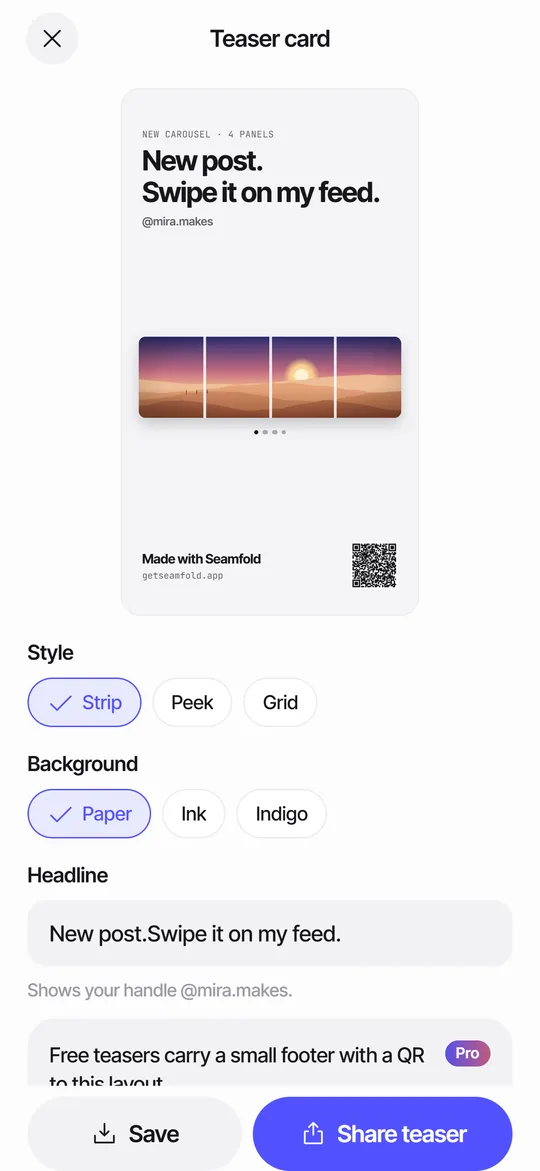
Three layouts cover nearly every case, and they match the three styles in Seamfold's teaser card: Strip, Peek and Grid.
| Layout | What it shows | Best for |
|---|---|---|
| Strip | The whole spread across the card, with the fold lines dashed | Panoramas, where the whole picture is the hook |
| Peek | Panel 1 large, with panel 2 peeking in beside an arrow | Photo sets with a strong first image |
| Grid | A 3 x 3 grid with the new cover highlighted | Accounts whose grid has a color story |
What should the text say?
Five words or fewer, and a clear verb. "New post. Swipe it on my feed." is Seamfold's default, and short variations work: "New carousel, swipe through," "Four panels, one view," or "Out now, swipe." Add a date for a launch, or the name of a place for a travel post. Do not write a paragraph. A story shows for a few seconds, and viewers read about as many words as they can hold in a glance.
When should you post the teaser?
As soon as the carousel is live, so that the story sends traffic to a post that exists. Posting the story first and the carousel later leaves a dead end. If you can, add the post to the story from the share menu, so the tap goes straight to it. Some creators post a second teaser a day later for followers who missed the first, or pin the story to a highlight called New. Do not post more than two teasers for one carousel.
How do you make a teaser on iPhone?
- Finish the carousel and save the panels to Photos.
- Open the teaser screen from the Saved screen in the app.
- Pick a style: Strip, Peek or Grid.
- Choose a background: paper, ink or indigo.
- Edit the headline if you want a different line.
- Tap Share teaser to send the PNG through the share sheet, or Save to Photos, then publish it in the social app yourself.
What is the QR code on the card?
On the free plan, the card ends with a footer, Made with Seamfold, and a QR code. Scanning it opens a layout page. If the app is installed, the link opens Start with this layout, and one tap leads to the photo picker and an editor with the same layout. The link holds a layout name, a ratio, a panel count and a background color. No photo, name or identifier is included. Pro can hide the footer and the code. Seamfold is in development, so the store button on that page appears when it is released.
Other ideas for the story
- Show a before and after: the first panel, then the full strip.
- Use the poll sticker to ask which panel people like most.
- Add the link sticker only if the post is in a place that supports it.
- Make a story with a countdown for a launch.
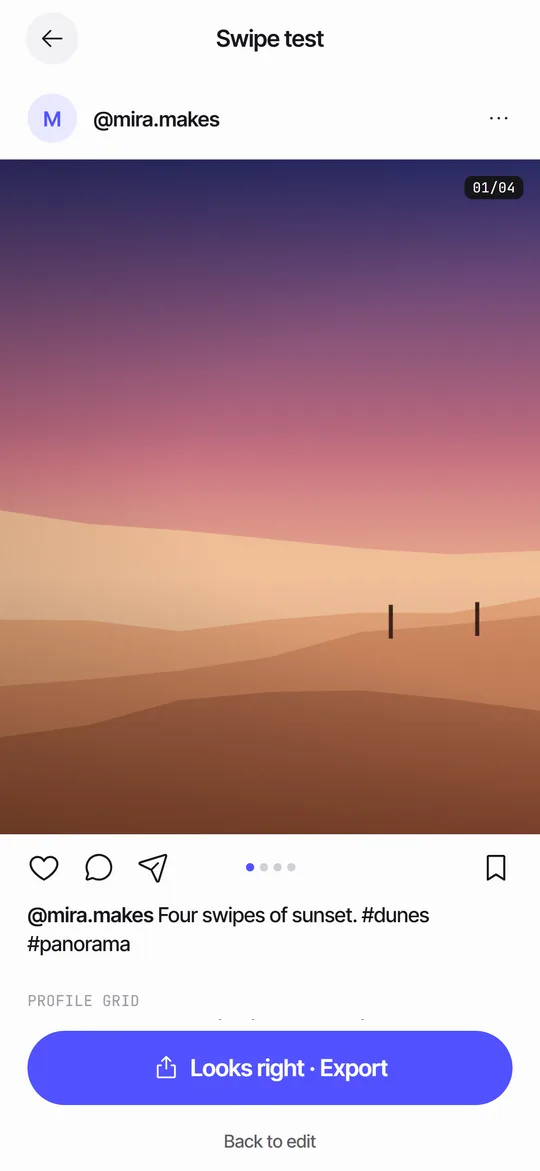
- Post a screen recording of the swipe test, so viewers see the motion.
- Share a close-up of one panel with the words Swipe to see where it goes.
How do you pick a teaser for a panorama?
Use the Strip layout, because it shows the full width of the picture at a glance. The strip is a thin image across a tall card, which leaves room for a headline above and a footer below. Choose a background that contrasts with the photo: ink for a bright landscape, paper for a dark one. Keep the dashed fold lines visible, since they hint that the picture is made of panels and the viewer can swipe through them. If the panorama is the surprise, use Peek instead and show only the first panel and the edge of the second.
What if the carousel is a photo set?
Use Peek or Grid. Peek puts panel 1 large with panel 2 peeking in beside an arrow, so the viewer sees a first image and a hint of the second. Grid suits accounts with a strong grid look: it shows a 3 x 3 grid with the new cover highlighted, which tells followers where to find the post on your profile. Pick the layout by what the carousel does and not by taste, as the teaser card page explains.
How do you measure whether a teaser helped?
Look at the story's reach and taps forward, then at the carousel's reach in the first hours after posting. Compare with a carousel you posted without a teaser. If the story gets views but the post sees little change, the card did not give people a reason to tap. Try a more specific line, or a stronger first panel. Run the test across several posts before drawing a conclusion.
Common mistakes
Teasers fail for simple reasons. The text is too small, the card is in the wrong ratio, the card covers the carousel's best moment or the story goes up before the post. Another mistake is making the teaser so complete that nobody needs to open the post. Show enough to explain what is coming and keep a reason to tap. For a panorama, the Strip style shows the whole picture at a glance, so use a darker background or a small size if you want to keep some surprise.
Frequently asked questions
What size should a story teaser be?
1080 x 1920 px, a 9:16 vertical image. Keep the key content away from the top and bottom edges.
When should I post a carousel teaser?
Right after the carousel goes live, so the story links to an existing post.
How many words should a story teaser have?
Five or fewer. People read stories in a second or two.
Does Seamfold post stories for me?
No. It makes the card and gives you the share sheet. You choose the app and publish it yourself.
What does the QR code on the card do?
It opens a link with a layout name, ratio, panel count and color. It carries no photos or personal data. Pro can hide the footer and code.
Keep exploring
 Story Teaser Card for Carousel PostsA 9:16 story card with the full spread, a headline and a QR code to the layout.Carousel SizeSizes for 4:5, 3:4 and square carousel panels, slide limits and how to choose.How to Make a Seamless Carousel on iPhoneFive steps from one wide picture to a swipe post whose panels line up.
 Swipe TestPage through your panels in a post frame and see the cover in a 3:4 grid.Travel Photo Carousel Ideas for Social MediaEight travel carousel formats with slide plans, a panorama opener and caption tips.