 Seamfold
Carousel alt text: how to write it for each slide
Alt text is a short written description of an image that screen readers speak aloud to people who cannot see it. In a carousel each slide has its own field, found under advanced settings when you post or in the edit screen. Describe what is visible, in one plain sentence, and say where the slide sits in the sequence.
Coming soon to iPhone
What is alt text and why use it?
Alt text is a written description attached to an image. A person who uses a screen reader hears it instead of seeing the picture, and the text also shows when an image fails to load. The idea comes from the web, where the alt attribute has served the same purpose for decades, and it belongs to the wider practice of web accessibility. On the social app it is optional, which means that most posts skip it. A carousel with alt text is open to more people.
Where is the alt text field for a carousel?
Menus change, so look for these labels on your phone. While you create a post, after the caption screen, open Advanced settings and look for Write alt text. In a carousel, the screen shows the slides, and you write a description for each one. After posting, open the edit screen for the post and look for the same option under the image. If your version does not show it, check the help pages of the app you post to for the current location. The social app also creates automatic descriptions by itself, but they are generic, and a human description is better.
What should the text say?
Describe the slide in a sentence or two, in the order a person would notice things. Start with the main subject, then the setting, then any visible text. Skip phrases such as image of or picture of, since the screen reader already says it is an image. Keep it factual and short, because the field is limited in length and long descriptions are tiring to hear.
How do you describe different kinds of slides?
| Slide type | What to include | Example |
|---|---|---|
| Photo | Subject, place, light | A fishing boat tied to a stone pier at sunrise, with calm water. |
| Panorama panel | The scene and its position in the sequence | Slide 2 of 4: the bay continues to the right, with a ferry in the distance. |
| Text slide | The words on it, verbatim | Seven camera settings to change first. |
| Cover | The title and the visual | Title card: Pier to pier, over a photo of the bay. |
| Chart or list | The main takeaway and key items | A table with three sizes: 4:5, 3:4 and 1:1. |
| Screenshot | What the screen shows | A phone screen with the editor open and three panels. |
How do you write alt text for a panorama carousel?
A panorama is a single picture cut into slides, so each slide shows only part of it. Describe what is on that slide and mention the continuity: that the scene runs on from the previous slide or to the next one. A listener cannot see the folds, so a hint such as the road continues to the right helps them build the whole picture. In the last slide, say that the panorama ends there. Do not repeat the full description on every slide.
How do you do it step by step?
- Finish the carousel and open the share screen.
- Open Advanced settings and tap Write alt text.
- Look at each slide and write one sentence about what it shows.
- For text slides, copy the words as they appear.
- Check that the slides in a panorama refer to each other.
- Share, then reread one description on the live post to confirm it saved.
What should you avoid?
- Keyword lists. Alt text is for people, not for search tricks.
- Starting with image of or photo of.
- Descriptions longer than a short sentence or two.
- Leaving text slides undescribed, because the words are the whole content.
- Copying the caption into the alt field, which makes the screen reader repeat itself.
- Writing jokes that hide what the picture shows.
Does alt text help with search?
It can help a little, since text that describes an image is a signal about what the image shows. But the main reason is access. Treat any search benefit as a side effect, and write for the listener. A description that works for a listener is also clear to a crawler.
Should text on slides be readable by itself?
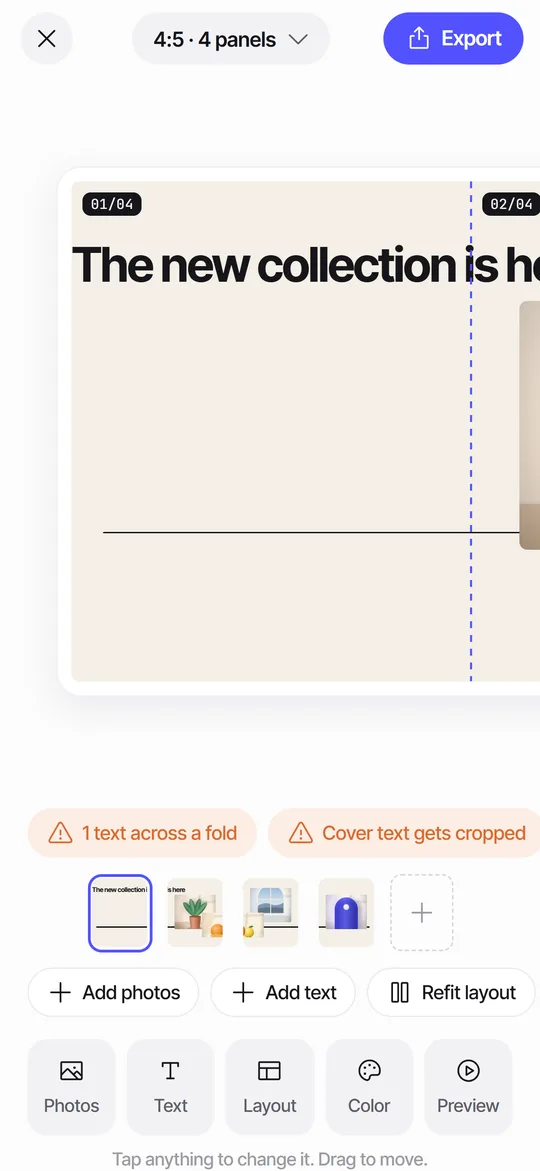
Yes. A slide with small, low-contrast words is hard to read for many sighted people too, and impossible for a screen reader unless you add alt text. Make text large, use strong contrast and keep it short. Seamfold's editor has display and mono text styles with size, alignment and color controls, and the seam check flags words on a fold, so a headline stays readable on one slide. Writing the alt text is still your job, as the app does not generate descriptions.
How much detail is too much?
Enough that a listener could picture the slide, and no more. A useful test is to read the text aloud and time it. If it takes more than ten seconds, cut it. Details that matter to the meaning of the post stay, such as a product name or a place. Details that only decorate go. Colors can help when they carry meaning, as in a red door that is the subject of a photo, and they are noise when they describe every pixel.
How do you keep alt text consistent across a set?
Use a simple template and fill in the blanks. For example: subject, setting, extra detail. A set of five slides might read: the trailhead sign at dawn; a hiker on a ridge with low cloud; a close-up of wet moss on a rock; a tent beside a lake; the lake at night with stars. Each line is short and different, and together they tell the same story as the images. In a panorama, add the slide number as part of the description so the listener can place each piece.
What changes when you edit after posting?
You can add or fix alt text from the post's edit screen, so a missing description is not a lost cause. Go back to older posts that did well and add descriptions, starting with the most viewed. It takes a couple of minutes each, and it makes your archive more welcoming. Keep a note of the text in your plan, so that you can reuse it if you repost. In Seamfold's feed plan the caption draft lives next to the cover, and a short line for alt text can go in the same place.
How does this connect to captions?
The caption tells the story, and the alt text describes the pictures. They have different jobs, so do not paste one into the other. See the guide to carousel captions for how to write the caption itself.
Frequently asked questions
Can I add alt text to each slide of a carousel?
Yes. Each slide has its own alt text field, found under Advanced settings when you post or in the post's edit screen.
How long should alt text be?
One or two short sentences. The field has a length limit, and long descriptions are tiring to hear.
Do I need alt text for text slides?
Yes. Write the words as they appear on the slide so a screen reader can speak them.
Does the social app write alt text automatically?
It can generate a description, but it is generic. A description you write yourself is more accurate.
Does Seamfold write alt text for me?
No. You add alt text in the social app when you post. Seamfold helps by keeping text large and off the folds. It is in development.
Keep exploring
 Seam CheckFinds text cut by a fold between panels and moves it for you.How to Make a Seamless Carousel on iPhoneFive steps from one wide picture to a swipe post whose panels line up.Carousel Cover Ideas for the First SlideTen cover ideas and layout rules for the first slide, tuned for the 3:4 profile grid.What to Put on the Last Slide of a CarouselIdeas for the final slide of guides, photo sets and panoramas, plus layout and wording tips.